Showing posts with label cataloging. Show all posts

Sunday, August 18, 2013

Library ILS Lecture

1. Watch the MediaSite video of the lecture on “Library ILS” and post your thoughts on your blog.

NOTE: ILS stands for Integrated Library System

Open Source ILS vs. Proprietary ILS

It was nice to *see* some other SLIS students and get an idea of what a classroom looks like and how the lectures are recorded.

I like listening to the comments from the students and how Dr. Roland is eager for input about things he didn’t know about such as the WorldCat link that takes users to a website where they can buy the book they were looking for. It is unreasonable to expect anyone to have up-to-date knowledge of features that come and go so quickly and it is through these discussions that we all can gain insight.

If I were setting up an ILS at our library from the beginning, i.e., if we were just now moving away from cards and written ledgers, I would pursue using an open source ILS such as Evergreen or Koha. As we already have an OPAC, I’m not sure I would change due to the convenience of continuing with what we have. Our current OPAC, Follett Destiny, certainly has some positive aspects and seems to work very well for school libraries. I do have some issues with Destiny and since it is proprietary, I am extremely limited with what I can do to acquire the features I desire. Typically, all I can do is wait for an update and hope it has what I want. I am not yet privy to our budget but when and if that time comes, I will still keep an open mind about open source ILSs especially if we feel a need to redirect funds. In that case, the time and trouble spent to convert to a new ILS may be worth the cost savings.

Although I have some nitpicks with Destiny, it does seem like a “good enough” solution for our library. I have come to believe that some of what I perceived as weaknesses are actually due to inadequate cataloging related to what a modern OPAC can do for patrons. Many of our materials are cataloged to a bare minimum necessary find the item’s call number if you already know the title or author but they lack rich subject tags or the proper entries required to allow the OPAC to actively link to all of the materials written by a specific author. Furthermore, many records do not use the correct authority file so it further makes materials difficult to link together. Fixing these catalog entries is very labor intensive and the relative benefit is small so it is difficult to justify spending much time but it is important to realize that some collocation issues we face may be less related to our OPAC software itself and more related to our catalog records themselves.

One Search

I am very interested in the list included in the following slide. I think that each of these points would be of great benefit to me as a library user and surely I am not alone.

image

In our OPAC, we have a feature called One Search and it does go partway towards #1 in the slide although it only searches databases or encyclopedias that we have already set up to work with it so it doesn’t search *everything* and *everywhere*. However, I think this is mostly good for our students. They tend to need help narrowing down from broad Google searches to narrower and more reliable information sources and these partially curated One Search results are useful to them.

Google search already does all of the things in the list from the slide. I truly do have concerns about Google or any company maintaining so much personal information but it seems that Google will be an important part of the future and although their ultimate goal is to make money, so far they have done a wonderful service to the world in making increasing amounts of data and information available to people who want to find it. At this point I’m much more concerned about what governments do and will do with my information than I am with what Google does and will do with my information.

Sunday, August 4, 2013

The Laws of the Jungle

1. On p. 88 Weinberger writes that order often hides more than it reveals, which may be yet another reason why people prefer the search engine over the library catalog. What experiences have you had in which you discover something of interest through Google or a library OPAC while looking for something else?
2. What do you think of Weinberger's statement on page 89 in the first full paragraph about how the way we organize information limits our vision and gives more power to those who control the organization of information than to those who create it?
3. From your experience of working with Flickr or another web based photo archive for your second assignment, do you agree with Weinberger's statement "that the bigger the mess the more accurate is Flickr's analysis (p. 95)?
4. Check out the PennTags project that Weinberger refers to in this chapter at: http://tags.library.upenn.edu/
Explore and comment on its usefulness as a search tool for a library collection.
1
I rarely use Google for anything more than a specific search and typically find what I need and get out. I regularly get lost in my library’s OPAC. It started last year just after I started my job and started learning about MARC on my own. I noticed that some of the subjects and authors shown in a surrogate record were active links (that I could click on and see all the records for that author or subject. However, some were not. For example, some of the books in our catalog by Beverly Cleary had active links and some did not. If I clicked on the active link for Beverly Cleary, I could see a list of books by Beverly Cleary but those without the active links may or may not be in that list – usually not. I learned that this was related to how the MARC records were entered. When I saw how useful it was to have those links be active and how much better it would be for patrons if the catalog records were updated so the active links would actually return *everything* the library has by that author or subject, I started spending a little time each week finding and updating the MARC records in the appropriate fields. I also found something similar for book series. Sometimes books 2-4 are linked by the MARC 490 field but book 1 is missing that entry – possibly because at the time it came out, it was not thought to be book 1 of a series. Following these links in our OPAC regularly leads me to information that I didn’t originally come to the OPAC for – especially the subject links.

2
I could not recall this exact quote so I re-read it. Glad I did. Weinberger uses that statement about media. He says “editors are more powerful than reporters, and communication syndicates are more powerful than editors because the get to decide what to bring to the surface and what to ignore.”
I certainly agree with him in this context of mass-media. I’m not so sure I agree, though, if the context were libraries and/or librarians. I like my miscellany with a bit of organization and I like my organization with a bit of miscellany. I don’t see it as a power struggle although I’m new to this profession and I’m sure there are battle lines drawn in places that I have not discovered yet. Certainly, the organizer’s bias will be evident in the process, but I hope libraries are organizing with the end user in mind. I should clarify. I do not mean that libraries should decide how the end user will want to use the information and organize it accordingly, rather, libraries should organize information to be as open as possible so that users can access with varying degrees of organization or miscellany – and the choice as to the exact degree is up to the end user.

4
PennTags has potential. I like the idea of bookmarking sites and making them available to others. It seems like del.icio.us but for a limited group of people. That isn’t a bad thing but it does seem like maybe PennTags isn’t very popular now. (UPDATE: After looking through more of the tags on PennTags, some of the tags are still in relatively heavy use through July 2013!) I think something like this might be useful but I’m not sure that it is needed in my organization. We use Google Apps for Education so we all have the benefits of Gmail’s powerful search capabilities. I do still use browser based bookmarks and sync them to all the computers and browsers that I use regularly. However, when I find a site that I *really* want to make sure I can find later and/or one that I want to share with my co-workers, I just send the link in an email with some text that will make it easily findable via Gmail search. I did this recently with the website about explorers mentioned in the 21st Century Librarian article we read/watched a couple weeks ago. I emailed the link to my co-workers with enough explanation that I can find it later in just a few seconds.
Our library does not currently catalog websites, but if we did or if we decide to in the future something similar to PennTags may be helpful even if just as a part of the brainstorming process. We do subscribe to some services that provide a curated list of websites appropriate for various ages on various topics and those websites are searchable through our OPAC… if we could just get students to use them.

Saturday, August 3, 2013

Why I missed the Wimba chat

I missed the recent Wimba chat because… something… came… up.

Here’s what happened…

We try to do an inventory at the end of the school year but apparently there had not been one done in a few years and so this spring we discovered many discrepancies and so we did not finish the inventory before school was out and staff left for the summer.

I went to the library several times over the summer – several times a week – and worked on my SLIS program and some other things and also spent some time continuing the inventory. I kept finding mistakes and fixing them and the process was moving along nicely and I felt like I would finish this past week before teachers arrive for work next week.

Our library team had already finished the inventories in all of the sections of the library except for high school non-fiction. Some aides (and my son who I got to work for me) had scanned a few hundred HS-NF books starting at 000 and I uploaded the barcode list to the inventory and then made a printout of the results of what had been scanned/uploaded.

The printout shows the status of every book that was scanned. If the book is in the correct place (both HS-NF and correctly shelved) there is just an entry with no message. If, however, the scanned book has some issue, I’ll see the issue mentioned in a note. Some common issues are that the book is from another area (perhaps elementary NF) or the book was marked as lost (now found-YEA!) or that it is currently checked out (hmmm) or that it simply is mis-shelved relative to the other books on the shelf.

So I took the printout to the stacks and started looking for the first book with an issue – a book that was mis-shelved…

I looked at the shelves for the book and I couldn’t find it because every book on the shelf was incorrect. The books should match the printed report but sometime between the scanning of the barcodes and when I looked at the shelf, someone had rearranged the books on this shelf. My first thought was that someone did it as a prank on the library staff.

But then I looked at the next shelf. Same. Every book is mis-shelved.

Next shelf. Same. Mis-shelved. Are you kidding me?

I run to the next shelf and the next and it is clear that we have a library apocalypse on our hands. Eventually I discover that every book on every shelf in every section of the library is mis-shelved.

The good news was that each book was still on the shelf where it belonged but all the books on each shelf were mixed up.

My mind was spinning trying to think of what could have happened. I started playing back events in my mind and I realized that I had seen our new cleaning lady dusting the books and shelves throughout the library for many many days in a row. I remembered thinking how diligent and committed she was to her job. I even told her how much I appreciated the time she was spending.

I realized that I saw her almost every day for 2 weeks while she was taking books off the shelf, dusting the shelf, and then dusting each book as she reshelved them by height.

YES. OUR BOOKS. ALL OF THEM. WERE NOW SHELVED BY HEIGHT.

I missed the Wimba chat because I lost my mind.

Fortunately, several students, parents, and teachers came to our aid and we have everything shelved correctly again….

By color. ROY G BIV *


*not really! :-)

Sunday, July 21, 2013

Mortimer Adler – alphabetization and “inherent… inner connections”

1. What are your thoughts on Mortimer Adler’s stance against alphabetization? What do you think he means by “inherent in all things to be learned we should be able to find inner connections”?

Which order is correct?

A: 雞牛豬
B: 雞豬牛
C: 豬牛雞
D: 豬雞牛
E: 牛雞豬
F: 牛豬雞

Would it help if you knew the pronunciation?

雞=ㄐㄧ

牛=ㄋㄧㄡ

豬=ㄓㄨ

How about if we romanize the Chinese pronunciation?

雞=ji

牛=niu

豬=zhu

But what if we use a different (and yet perfectly valid) romanization scheme?

雞=ji

牛=niou

豬=jhu

What if we use the English translations of these characters?

雞=chicken

牛=beef

豬=pork

The concept of alphabetization in Chinese is nonsense. It simply doesn’t exist. But what about dictionaries? Chinese dictionaries could be ordered in a few different ways. Probably the most common order is based on a fundamental part of every character called a radical plus the number of strokes it takes to write the part of the character that is not the radical.

Clearly alphabetization has a number of practical uses but as multilingual library cataloging and metadata and cooperative cataloging increase, librarians will see many limitations. The example I gave with the Chinese characters shows that alphabetization is simply not the answer to organizing the world’s information.

I think robust machine readable metadata is a key to organization. Alphabetization can be a *part* of such schemes, but we should also look beyond it.

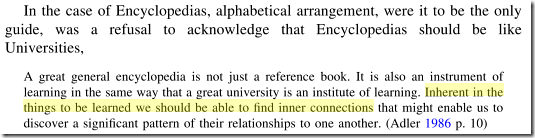
I suspected that Weinberger clipped the quote so I searched for the phrase in question and found a quote that provided a little better context. Here’s a screencap from Logic and the Organization of Information by Martin Frické at Google Book.

Adler quote context

I doubt very much (but don’t know for sure) that Adler found alphabetization to be useless. Rather, I think he was hoping to help encourage the classification of knowledge based on inherent connections, patterns, and relationships. Interestingly… these are some of the very words used to describe the principles and usage of FRBR.

A single place or multiple places?

2. Weinberger writes on page 14 that the digital world allows us to transcend the fundamental rule of everything having its place because things can now be assigned multiple places simultaneously. This speaks to the very core of library current and continuing existence. What are libraries doing and/or need to do to transcend this fundamental rule in order to stay relevant to information users? Do libraries need to do anything at all?

I’m not going to buy multiple copies of a book just so I can put it on the shelf in every conceivable location where it might like to be found. I’m new to this field (librarianship) but I suspect almost no one does this.

What we already have in my library and I suspect in most libraries is an OPAC where we can have a single record that corresponds to a single resource but the record can be located using multiple access points. Therefore, even though the resource is a single physical item such as a book, a DVD, or even a digital computer file, the resource can be located in a variety of ways.

Having multiple access points is great but does create some of its own issues especially related to how the resource is cataloged. Let’s look at an example for subject entries for a particular record.

  • The record might display too few subjects. This happens when a cataloger fails to enter subjects that the resource actually contains information on. An information seeker may search for a topic but not locate the resource because the catalog doesn’t contain the subject term although the resource itself does.
  • The record might display too many subjects. This happens when a cataloger includes subjects that are not given proper treatment by the resource. This will cause a resource to show up in search results but then not provide value to the information seeker.

In both cases mentioned above, the record and the resource it refers to are less relevant to the information seeker than is desired.

My experience with other libraries is not enough to prescribe universal solutions but I know that in the library where I work our patrons would benefit from a systematic check-up of our database – especially for older or less common materials that were originally cataloged in-house in the past. I do sometimes try to update these records when I come across them, but it is often difficult to squeeze in such work along with regular duties.

Below is one such item from our catalog. Besides the fact that this item is probably a good candidate for weeding, it is lacking several things that we would like to see in every record:

  • a summary so patrons can find it in a keyword search
  • a cover image
  • 3-5 authorized subjects (typically Sears)
  • a book from 1911 that is not weeded may also benefit from some additional information that will help an information seeker know if it may be relevant to their needs.

OPAC record example